The editor screen
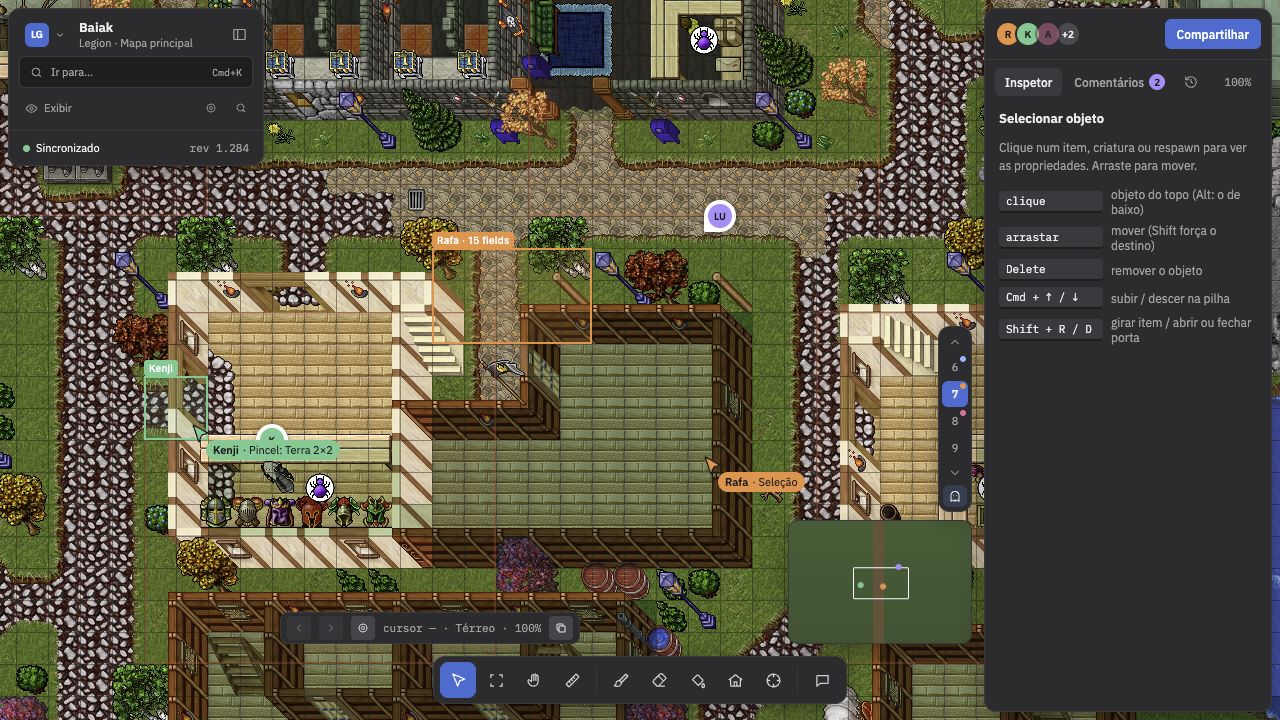 {.shot}
- Map (center): the canvas where you paint, select and drag.
- Toolbar (bottom): V, M, H, R, B, E, G, Z, S and C. See Tools.
- Left panel: the map tree (towns, houses, respawns, waypoints and zones), the palette and search. The LG menu at the top of the panel opens passes over the whole map.
- Right panel: the inspector. It shows what is under the cursor or selected: item stack, attributes, tile flags, respawn, house, and the Selection section when an area is marked.
- Floor selector (right of the map): floors 0 to 15. PgUp and PgDn change floor.
- Minimap: click it to jump to another region.
- Status bar: item, creature, flags and zoom under the cursor.
The View button (Exibir) turns drawing layers on and off: grid, zones, respawns, creatures, tooltips and creature names, light, shade, wall hooks, locked doors and “modified only”.
- Tooltips and names disappear below 50% zoom.
- Light uses the items’ lights and darkens the underground floors.
- Modified only highlights the tiles you edited in this session.