USER GUIDE
Everything to edit
your map.
Documentation for Orbiz, the collaborative map editor for Open Tibia: tools, respawns, houses, projects and publishing.
in the browserReal-time
collaborationVersion
historyNothing to
install
IN THIS GUIDE
From the first tile to publishing.
Pick where to start.
Start
Create your account, open a project and learn the editor screen.
Editing the map
Brush, palette, area selection, automatic borders, copy and paste.
Respawns, houses and zones
Edit respawns, generate respawns over an area, and manage houses, towns and waypoints.
Search and cleanup
Find items, action ids and duplicates, and clean up the map in bulk.
Projects and team
Layers, publishing, teammates' cursors, comments and history.
Reference
Shortcuts, plans and limits, and the FAQ.
INSIDE THE EDITOR
The editor screen.
Toolbar on the left, map in the center, layers and palette on the right. The page The editor screen explains each part.
Learn the screen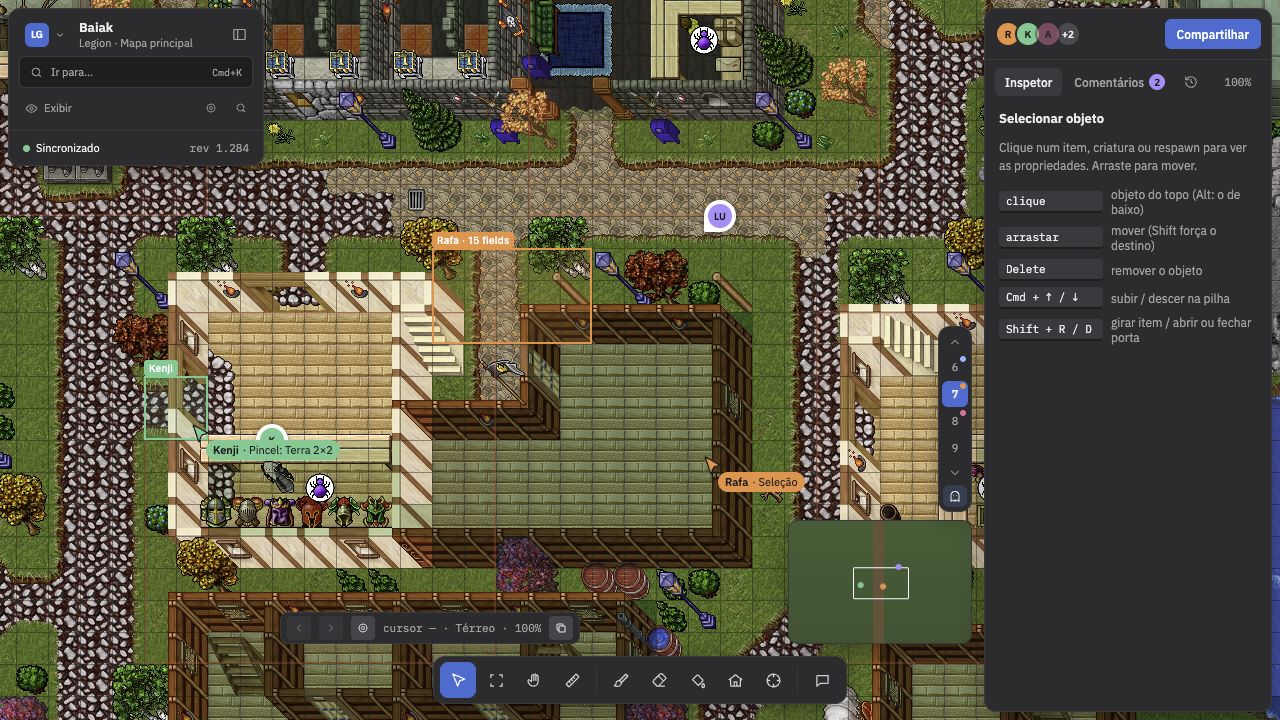
READY TO START
Open the editor and edit your world.
Orbiz runs in the browser, with nothing to install. Start alone and bring your team whenever you want.